AI video moved fast this year. Some tools got a lot better. One big name went away. OpenAI shut down the Sora app on April 26, and the Sora API stops taking requests on September 24. If you read our earlier piece on Sora, that is quite a turn.
So what are filmmakers and VFX artists actually using now? We looked at nine tools. Some make shots from a prompt. Others work on footage you already shot. For each one you get the main features, what it costs, and an official showreel from the company so you can judge the output yourself.
Prices are as of September 22, 2026. These companies change plans often, so check the pricing page before you sign up.
Quick comparison
| Tool | Company | Best for | Starting price |
|---|---|---|---|
| Veo 3.1 in Flow | Realistic shots with sound | Free tier, Pro $19.99/mo | |
| Gen-4.5 + Aleph 2.0 | Runway | Generating and editing in one app | $15/mo |
| Kling 3.0 | Kuaishou | Multi-shot scenes with dialogue | Free credits, paid from about $9/mo |
| Ray3.14 | Luma AI | HDR output, restyling footage | $30/mo |
| Seedance 2.5 | ByteDance | Long 30-second takes | About $0.10 per second |
| Marey | Moonvalley | Licensed training data | $14.99/mo |
| Firefly | Adobe | Adobe users, many models in one plan | $9.99/mo |
| Flow Studio | Autodesk | Mocap, tracking, CG characters in plates | Free tier, Lite $10/mo |
| SwitchLight 3.0 | Beeble | Relighting real footage | From $16/mo (yearly) |
Part 1: AI video generators
These make new shots from text, images, or reference clips. This is where most of the hype lives.
Google Veo 3.1 (and Gemini Omni) in Flow
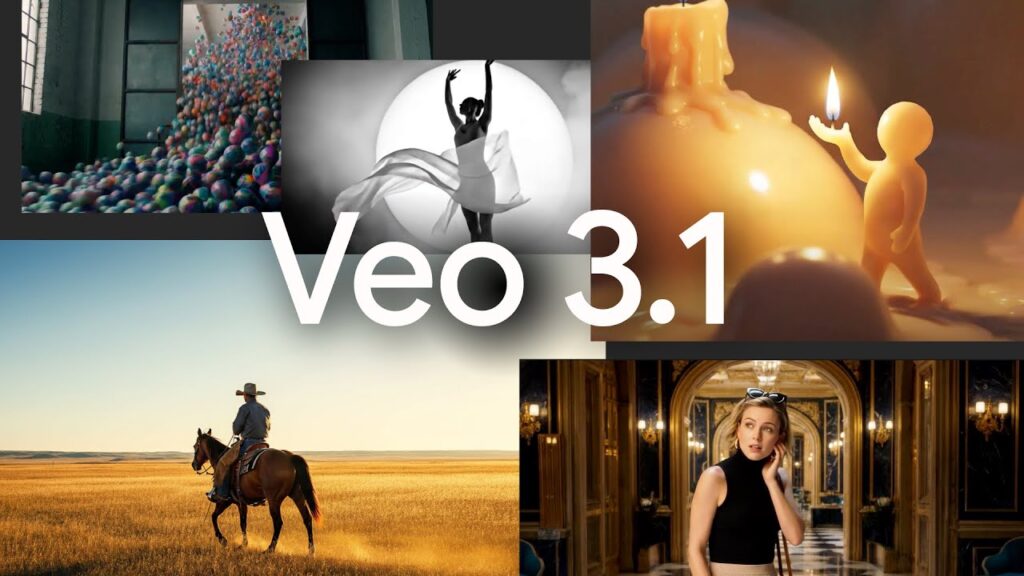
Veo is still the one to beat for raw realism. It makes picture and sound together, so you get dialogue, effects, and room tone in one pass. Google’s filmmaking app, Flow, wraps it in a shot-by-shot workspace. In May Google also added Gemini Omni Flash, which lets you edit a clip by just talking to it.
- Native audio: dialogue, sound effects, ambience
- 1080p and 4K output (4K is on the Ultra plans)
- Character consistency, first and last frame control, camera moves
- Scene extension, object insert and removal, outpainting
- Gemini Omni Flash: conversational edits, clips up to 10 seconds
Cost: Flow has a free tier with a small daily credit allowance. Google AI Pro is $19.99/mo with 1,000 Flow credits. Google AI Ultra now starts at $100/mo with 10,000 credits. The top Ultra tier dropped from $250 to $200/mo and includes 25,000 credits.
Runway Gen-4.5, Aleph 2.0 and Act-Two
Runway is the most complete toolbox on this list. Gen-4.5 is its flagship generator. The bigger deal for VFX people is Aleph 2.0, which edits footage you already have. Change one frame and the edit carries through the whole shot. Act-Two handles performance capture from a plain video of an actor.
- Gen-4.5: text to video and image to video
- Aleph 2.0: frame-level edits that propagate through a clip
- Act-Two: head, face, body and hand tracking from a driving video
- Other models built in, including Kling 3.0 and Seedance 2.5
- Max plan adds HDR, ProRes and image sequence output
Cost: Free gets 125 one-time credits, but no Gen-4.5. Standard is $15/mo ($12 billed yearly) with 625 credits, which is only about 52 seconds of Gen-4.5. Pro is $35/mo ($28 yearly) for about 187 seconds. Max is $95/mo ($76 yearly) for about 791 seconds.
Kling 3.0
Kling, from Chinese video platform Kuaishou, is strong on people. Faces, bodies and motion hold up well. Version 3.0 added a storyboard mode, so you can plan several shots in one generation instead of stitching clips together later.
- Clips up to 15 seconds
- Multi-shot storyboard: set length, shot size, angle and camera move per shot
- Native audio in English, Chinese, Japanese, Korean and Spanish, with multi-character dialogue
- Character references that keep both the look and the voice
- A faster 3.0 Turbo version for volume work
Cost: There is a free tier with daily credits. Standard runs about $9 to $10 a month, or $79.20 a year. Pro is about $33 to $37 a month. Premier and Ultra go up from there. Kling runs a lot of promos, so the number you see may differ.
Luma AI Ray3.14
Luma leans toward post-production. Ray3 was the first video model to output HDR, and Ray3.14 made it faster and cheaper. The Modify tool takes a real performance and restyles it while keeping the actor’s timing. Luma’s app also lets you run other companies’ models from the same account.
- Native 1080p, about 4x faster and 3x cheaper per second than Ray3
- SDR, HDR and EXR output options
- Modify, Reframe and Extend for existing video
- Also runs Veo 3.1, Kling 3.0 and Seedance inside the same app
Cost: Plus is $30/mo ($25 yearly) with 10,000 credits. Pro is $90/mo ($75 yearly) with 40,000. Ultra is $300/mo ($250 yearly) with 150,000. All paid plans allow commercial use.
ByteDance Seedance 2.5
Seedance 2.5 came out in August. Its big trick is length. It makes up to 30 seconds as one continuous take, not a string of short clips glued together. It also takes a huge pile of references, which helps when you need a character or location to match across shots.
- Up to 30-second single takes
- Picture and audio made together, so lip sync and impacts line up
- Up to 50 reference files per request: 30 images, 10 videos, 10 audio clips
- Available in ByteDance’s Dreamina app, plus Runway, Luma and API platforms
Cost: Dreamina puts it at about $0.10 per second on its yearly Advanced plan. That is roughly $2.91 for a 30-second clip before retries. API pricing through third parties runs higher.
Moonvalley Marey
Marey is the one built for studios that worry about lawsuits. Moonvalley trained it only on licensed footage. It is also the most director-minded tool here. Instead of hoping a prompt lands, you can drive the camera and the motion directly.
- Trained on licensed data
- Camera control: turns a single image into a 3D scene you can move through
- Pose transfer and motion transfer from reference video
- Trajectory control: draw the path an object should follow
- 1080p output
Cost: Standard is $14.99/mo for up to 10 videos. Plus is $34.99/mo for up to 25. Pro is $149.99/mo for up to 100. Enterprise is custom.
Adobe Firefly
Firefly is less a single model and more a hub. You get Adobe’s own Firefly Video Model, which Adobe says is safe for commercial work. You also get partner models from Google, Runway, Kling, Luma and others under one bill. If you already live in Premiere and Photoshop, this is the easy on-ramp.
- Adobe’s own Firefly Video Model plus partner video models
- Sound effects, music and video translation built in
- Works alongside Premiere, Photoshop and Express
Cost: Standard is $9.99/mo (about 20 five-second clips). Pro is $19.99/mo (about 40). Pro Plus is $49.99/mo (about 100). Premium is $199.99/mo with unlimited Firefly Video Model use.
Part 2: AI tools for real VFX work
These two do not invent shots. They take live-action plates and do the tedious parts of VFX faster. For working artists, this is where AI is paying off right now.
Autodesk Flow Studio (formerly Wonder Studio)
Flow Studio started as Wonder Studio, the tool that swaps an actor for a CG character straight from a plate. Autodesk bought it and kept building. It now handles mocap, camera tracking and clean plates, then hands everything off to your 3D app.
- Markerless motion capture for body, face and hands
- Camera tracking, clean plates, alpha masks and character passes
- Video to 3D scene conversion
- Wonder 3D for text and image to 3D assets
- USD export to Maya, Blender, Unreal and 3ds Max
Cost: Free gives you 300 credits a month for watermarked mocap. Lite is $10/mo. Standard is $45/mo and Pro is $95/mo, with yearly discounts. Pro is also included in Autodesk’s Media and Entertainment Collection.
Beeble SwitchLight 3.0
Beeble does one thing very well: relighting. SwitchLight breaks your footage into the passes a 3D artist would want, like normals and albedo. Then you can relight the actor to match a new background. Version 3.0 looks at several frames at once, which cuts down on flicker.
- Video to PBR passes for relighting in Nuke, Blender or Unreal
- Multi-frame processing, up to 4K
- Cloud tools: background removal, SwitchX lighting and background swaps, SDR to HDR, upscaling
- Beeble Studio runs locally on Windows with an NVIDIA GPU and writes 16-bit EXRs
Cost: Beeble Cloud Creator is $16/mo billed yearly. Professional is $60/mo billed yearly and adds 4K, 10-bit output. The local Beeble Studio app is $504 a year for indies earning under $200,000, or $3,000 a year standard.
Which one should you pick?
- Most realistic shot with sound: Veo 3.1 in Flow
- Changing footage you already shot: Runway Aleph 2.0 or Luma Modify
- A scene with several shots and dialogue: Kling 3.0
- One long take: Seedance 2.5
- Client or legal team asks about training data: Moonvalley Marey or Adobe Firefly
- Mocap, tracking and CG characters in live action: Autodesk Flow Studio
- Relighting plates: Beeble
- Tight budget: Google’s free Flow tier or Kling’s free credits
One last thing. Every price above is for a clean result on the first try. That rarely happens. Plan on three to five attempts per usable shot and budget credits for it.
None of these tools make a movie by themselves yet. They make shots. The artists who know how to fit those shots into a real pipeline are the ones getting hired. More on that in VFX Jobs in 2026: Who’s Hiring and How AI Is Changing the Work. New to all this? Start with What Is VFX?



Leave a Reply